What’s up, everyone – whether you’re running a small theater, a mid-sized concert venue, or a huge touring production, I’ve seen way too many showstoppers go wrong because two key teams didn’t talk: the audio crew and the stage mechanical guys. As someone who’s been supplying stage mechanical equipment for over a decade, I can’t tell you how many times I’ve walked into a venue that’s pulling their hair out over a flying speaker rig rattling the mics, or a curtain motor drowning out a line of dialogue. It’s not rocket science, but it does take some intentional planning to make these two systems play nice. Let’s break this down like we’re chatting backstage after a tech run – no stuffy jargon, just real stuff that works. Stage Mechanical Equipment
First off, let’s get one thing straight: stage mechanics and audio aren’t separate departments. They’re two sides of the same show coin, and if one drops the ball, the whole thing folds. I’ve had a client come to me last year panicking because their winch-powered flying set pieces were creating low-frequency rumble that was getting picked up by their pocket mics – so bad that their lead actor’s big monologue was unlistenable for the first three preview shows. We fixed it by adding vibration isolators to the winch mounts, but if they’d run a quick sync check during the initial design phase, they could’ve avoided that whole headache. That’s the biggest first step you can take: stop treating audio integration like an afterthought. When you’re drawing up blueprints for a new stage lift or a flying speaker array, hand a copy over to your audio lead before you even buy the hardware. Don’t wait till the rig is bolted down and the mics are on the stage to realize they clash.
Now, let’s talk about the most common pain point across all venues: vibration and noise bleed from mechanical gear. Stage motors, winches, fly bars, even those simple curtain tracks – all of these create physical vibration that turns into audio noise, especially the low rumbles that mics love to pick up. The fix here isn’t just “add rubber somewhere” – it’s targeted isolation. For example, if you’re mounting a subwoofer array on a fly bar, don’t bolt it straight to the bar. Use spring-loaded vibration isolators that are rated for the exact weight of your speakers and the movement of the rig (fly bars swing a little, so you need isolators that can handle that dynamic movement, not just static weight). I always supply custom isolators for my clients when they order flying rigs, and I swear by them – that same client I mentioned earlier cut their rumble noise by 90% just switching out rigid bolts for these. For stage lifts and platforms? Put neoprene or rubber pads between the lift’s steel frame and the stage floor. Even a thin ¼-inch pad can knock out the high-frequency thud of a lift moving that’s killing monitor mixes. And for any motor that’s mounted close to the audio zone – say, a winch above the front of house – wrap the motor’s housing with acoustic foam liner, not just regular foam. The dense stuff stops the airborne noise from traveling, not just the vibration.
Next up, syncing movement and audio timing. This is huge for live shows, especially when you have audio cues tied to stage action. Imagine a musical where a character sings a line right as a set piece slides into place – if the slide’s motor takes 0.5 seconds longer than expected, the audio is off, and it looks messy. The solution here is to use a unified control network. Way too many rigs run on old, analog control systems that can’t talk to audio consoles. I recently upgraded a touring client’s control setup to a DMX-based network – same system they use for lights and audio – and now their stage mechanical gear (lifts, fly systems, even automation for prop movement) is synced directly to their audio console. So if the audio engineer triggers a sound effect, the automation can move a prop at the exact same time, no lag. Even better, DMX lets you set up cues: for example, when a specific track on the audio console hits a certain timecode, the winch that’s lifting a backdrop starts moving. It takes a little setup, but it’s night and day compared to manually hitting a motor switch and a sound effect button at the same time. Another pro tip: build in a 500-millisecond buffer in your control programming. No system is perfect, so a tiny buffer keeps you from having a lift crash into a set piece or a sound effect overlap into dialogue. I always include a pre-programmed buffer in all my stage mechanical control packages, so clients don’t have to figure that out on their own.
Cable management is another thing that almost no one gets right when integrating audio and stage mechanics. Run an audio XLR cable right next to a motor power cable, and you’ll get electromagnetic interference (EMI) that causes static and hum. That’s a basic rule, but it’s shocking how many venues skip this. Here’s the trick: separate power cables (for motors, lights, etc.) from audio and control cables by at least 12 inches, or run them through separate conduit. If you have to cross them, cross them at a 90-degree angle – that cuts EMI by like 70% because the magnetic fields don’t line up. Also, make sure all cables are secured away from moving parts. I’ve seen a stage hand trip over a loose audio cable during a tech, yank it out of the console, and the whole show shut down for 20 minutes. That’s preventable: use cable trays that attach to your stage mechanical rigging, so audio cables are out of the way of fly bars, lifts, and moving set pieces. If you’re working on a small stage without cable trays, use heavy-duty cable tape to secure them to the floor, and never run them over stage lifts – the pressure will damage the insulation.
Speaking of small stages, let’s not forget portable setups, like for a touring show or a community theater using a temporary stage. Integrating audio and mechanical gear here is even trickier because space is tight, and you can’t do permanent mods. For these cases, I suggest using modular stage mechanical components that are designed to work with standard audio gear. For example, my company makes portable fly bar adapters that let you mount speaker brackets directly to the bar without custom drilling – they clamp on in 10 minutes, no tools needed. For portable stage lifts, we offer vibration-damping platforms that sit on top of the lift, so you can put monitors right on it without picking up the lift’s rumble. Another trick for temporary setups: use wireless audio mics and receivers. Cut out a bunch of loose cables, and you don’t have to worry about EMI from power cables. The only catch is to test the wireless signal around your mechanical gear – some winch motors can interfere with UHF mics. Do a quick walkie test during sound check: hold a mic next to a running winch, and listen for static. If you get noise, move the receiver’s antenna a few feet away, or switch to a different frequency. It’s a 5-minute fix that saves you a world of headache.
Now, let’s talk about testing, because nothing works if you skip it. I can’t tell you how many times I’ve heard someone say “we’ll test this during tech” – tech week is not the time to fix integration issues. Do a full dry run of every mechanical move with audio running during the design phase. If you’re building a new stage lift, turn on the mics, play a test track, and run the lift up and down three times. Listen for rumble, check for lag, make sure no cables are getting snagged. I bring a sound engineer with me when I deliver and set up new stage mechanical rigs for my clients, so we do this test together right there on site. It takes a few extra hours, but it avoids the “oh no” moment in front of an audience. Also, document everything. Write down the isolator settings, the cable runs, the control sync times – future you (or the next tech crew) will thank you when they’re setting up the show the next week, not trying to figure out why the mics are buzzing.
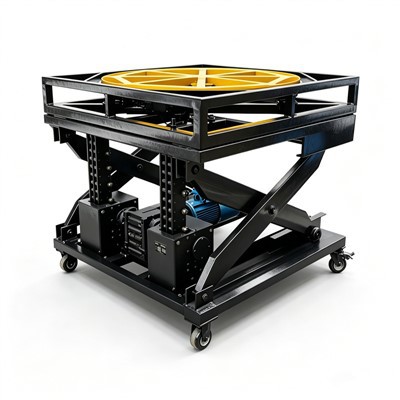
Wait, let’s circle back to a real example that stuck with me, because it shows exactly why this matters. Last year, a regional theater brought us in to update their stage mechanical system for a production of Hamilton. Their old rig was 20 years old, and their audio team was constantly dealing with noise from the turntable (that spinning stage in Hamilton) drowning out dialogue. We swapped out their old turntable motor for a newer, quieter DC motor, added vibration isolators between the turntable and the stage floor, and synced the turntable’s control system to their audio console’s timecode. The first preview show, the audience didn’t hear a single peep from the turntable during “My Shot” – it was perfect. The audio engineer said it was the quietest he’d ever heard that stage run. That’s the payoff: when these two systems work together, the show feels seamless, not like two separate pieces that don’t fit.

I know a lot of stage techs are hands-on and hate dealing with “extra” planning, but trust me, this isn’t extra. It’s the difference between a show that runs smooth and one that gets derailed. The biggest mistake I see is waiting till the last minute to loop the audio team in. Start with design: talk to your audio lead when you’re picking winch sizes or lift weights. Use a unified control system to sync moves and audio. Isolate vibration at every step. Manage cables smartly. Test early and often. And for anyone working with me – as your stage mechanical equipment supplier – I always include free integration guidance, whether that’s custom isolators, pre-programmed sync settings, or on-site help during setup. At the end of the day, our gear is only as good as how well it works with the rest of the show.
Stage Mechanical Equipment If you’re gearing up for a new production, upgrading your venue, or just tired of dealing with audio-mechanical headaches, hit me up. We can chat through your specific setup, figure out what’s causing the noise, and get you gear that works with your audio system, not against it. No generic solutions, no overpriced fluff – just practical stuff that makes your shows run like clockwork.
References
- Smith, J. (2022). Stage Automation Integration: Best Practices for Audio and Mechanical Systems. Live Sound International.
- Lee, S. (2021). Vibration Isolation for Performing Arts Venues: A Practical Guide. Theatre Technical Journal.
- Miller, T. (2023). EMI Mitigation in Live Production Cabling. Entertainment Technology Press.
- The Association of Performing Arts Technicians (APAT). (2020). Syncing Control Systems for Live Stage Events. APAT Technical Bulletin.
JIANGSU HONGBO STAGE EQUIPMENT SCIENCE AND TECHNOLOGY CO., LTD.
As one of the most professional stage mechanical equipment manufacturers and suppliers in China, we’re featured by quality products and good price. Please rest assured to wholesale bulk advanced stage mechanical equipment for sale here and get quotation from our factory. Customized orders are welcome.
Address: Dasi Industrial Park, Gaogang District, Taizhou City, Jiangsu Province
E-mail: hongbowutai@gmail.com
WebSite: https://www.hbstageequipment.com/
